three-finger-slash
Three Finger Slash
One click access to all windows, on macOS (via Hammerspoon) and Linux/X11.
Expose, tab switchers, window tiling... But you're still frustrated trying to find the right window? This might be what you need.
Features
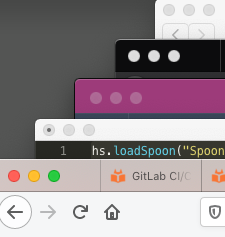
- Easy access - all visible windows on your focused screen are arranged in a reverse cascading manner.
- Reverse cascade: the front window is aligned to the left, keeping all window titles visible within easy access.
- Focused window moves to the front in an orderly fashion.
- Smart resizing: Windows keep their dimensions where possible, resized to fit within limits of the screen.
The default key is the Three Finger Slash (command option control / on macOS, super alt control / on Linux):
Setup — macOS
Requires Hammerspoon.
- Click on the Hammerspoon menu bar icon and choose Open Config from the menu.
- Add the contents of
macos/init.luafrom this repository to the file in the editor - Click on the Hammerspoon menu bar icon and choose Reload Config from the menu.
- Perform the Three Finger Slash!
Setup — Linux (X11)
Requires Python 3 and python-xlib:
sudo apt install python3-xlib     # Debian/Ubuntu
sudo dnf install python3-xlib     # Fedora
sudo pacman -S python-xlib        # Arch
Check it works by running it directly, with a few windows open:
./linux/three_finger_slash.py
Then bind it to a key. There is no Hammerspoon equivalent on Linux, so use whichever
hotkey daemon your desktop already runs. cmd has no Linux counterpart, so these use
super + alt + ctrl + /. Use the absolute path
to your clone in place of ~/three-finger-slash.
sxhkd — add to ~/.config/sxhkd/sxhkdrc:
super + alt + ctrl + slash
    ~/three-finger-slash/linux/three_finger_slash.py
xbindkeys — add to ~/.xbindkeysrc:
"~/three-finger-slash/linux/three_finger_slash.py"
    Mod4 + Alt + Control + slash
GNOME (X11 session) — register a custom shortcut:
KEY=/org/gnome/settings-daemon/plugins/media-keys/custom-keybindings/three-finger-slash/
gsettings set org.gnome.settings-daemon.plugins.media-keys custom-keybindings "['$KEY']"
gsettings set org.gnome.settings-daemon.plugins.media-keys.custom-keybinding:$KEY name 'Three Finger Slash'
gsettings set org.gnome.settings-daemon.plugins.media-keys.custom-keybinding:$KEY command "$HOME/three-finger-slash/linux/three_finger_slash.py"
gsettings set org.gnome.settings-daemon.plugins.media-keys.custom-keybinding:$KEY binding '<Super><Alt><Control>slash'
KDE Plasma — System Settings → Shortcuts → Add Command.
Notes
- Wayland is not supported. The script needs X11 window management, which Wayland deliberately does not expose to clients. It exits with a message rather than half-working under XWayland, where it would only see XWayland clients. Log into an X11/Xorg session (GNOME and Plasma both still offer one).
- If windows end up underneath a panel, your window manager isn't reporting
_NET_WORKAREA; raisePANEL_OFFSETinlinux/three_finger_slash.py. - Windows that constrain their own size (terminals sizing to whole character cells, for instance) may end up a few pixels short of the computed height. That's the application's size hints, not the cascade.
linux/dump_geometry.pyprints what the script sees — window list, frames and frame extents — which is the quickest way to diagnose odd placement.